
Posted on June 18, 2026
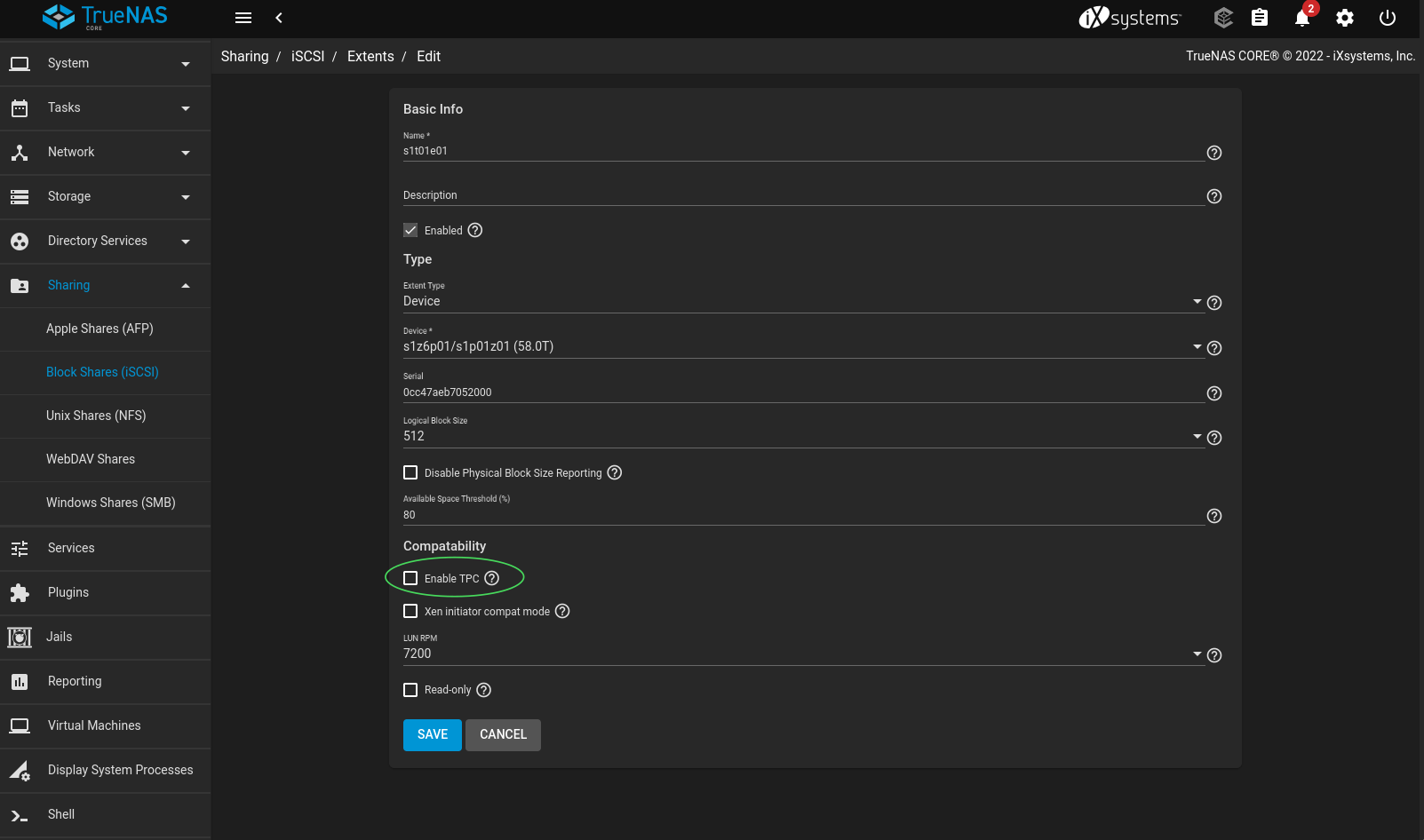
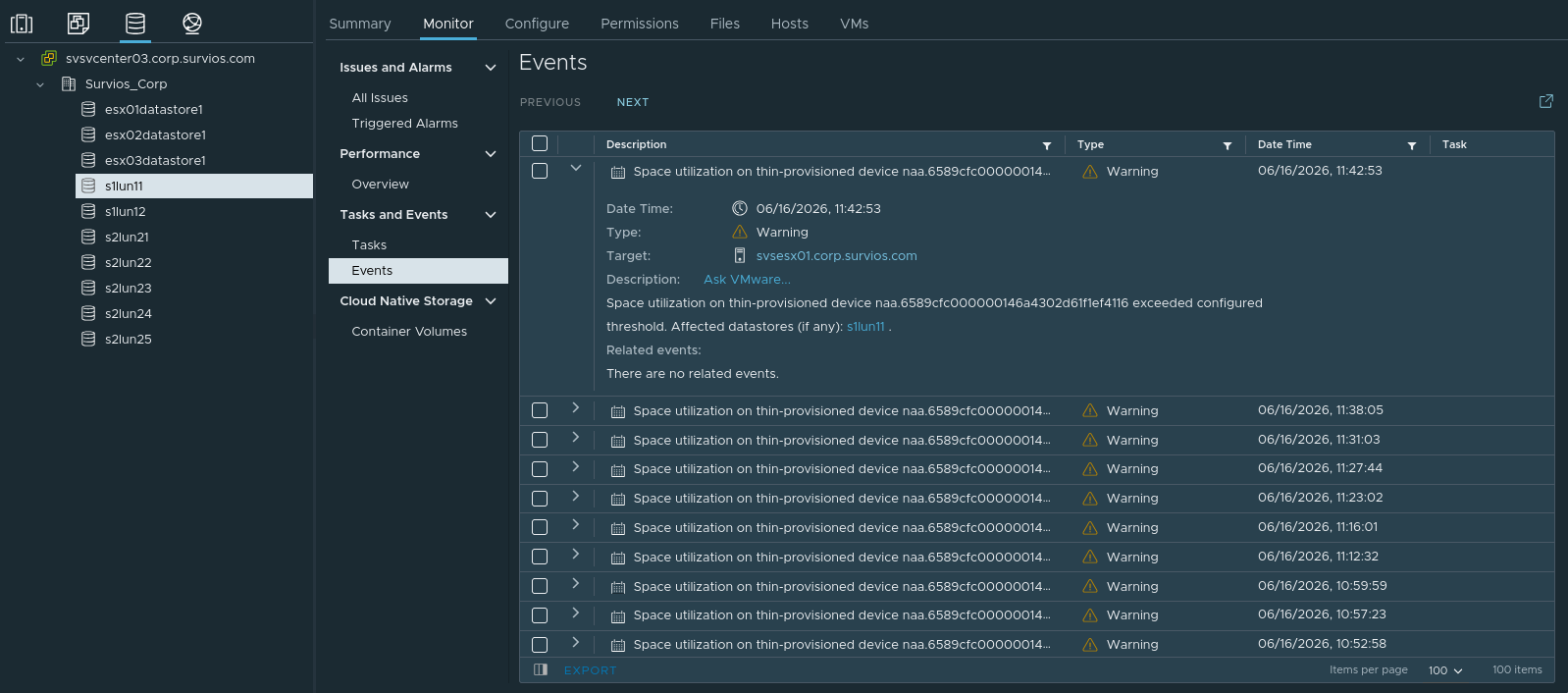
(bash) zpool events -v
Jun 14 2026 00:00:01.096587179 sysevent.fs.zfs.scrub_start
        version = 0x0
        class = "sysevent.fs.zfs.scrub_start"
        pool = "s1z6p01"
        pool_guid = 0x5090c805d7da8c67
        pool_state = 0x0
        pool_context = 0x0
        time = 0x6a2e5171 0x5c1cdab
        eid = 0xba

Jun 14 2026 00:00:01.096587179 sysevent.fs.zfs.history_event
        version = 0x0
        class = "sysevent.fs.zfs.history_event"
        pool = "s1z6p01"
        pool_guid = 0x5090c805d7da8c67
        pool_state = 0x0
        pool_context = 0x0
        history_hostname = "san01.corp.combobulate.test"
        history_internal_str = "func=1 mintxg=0 maxtxg=2462043"
        history_txg = 0x2591b
        history_time = 0x6a2e5171
        time = 0x6a2efd61 0x2e67c749
        eid = 0xbc

Jun 14 2026 00:00:01.096587179 sysevent.fs.zfs.scrub_finish
        version = 0x0
        class = "sysevent.fs.zfs.scrub_finish"
        pool = "s1z6p01"
        pool_guid = 0x5090c805d7da8c67
        pool_state = 0x0
        pool_context = 0x0
        time = 0x6a2efd61 0x2e67c749
        eid = 0xbd
(bash) cat /etc/ctl.conf
portal-group "default" {
}

portal-group "pg1" {
    tag "0x0001"
    discovery-filter "portal-name"
    discovery-auth-group "no-authentication"
    listen "10.10.250.10:3260"
    listen "10.10.251.10:3260"
    listen "10.10.252.10:3260"
    listen "10.10.253.10:3260"
    option "ha_shared" "on"
}

lun "s1t01e01" {
    ctl-lun "0"
    path "/dev/zvol/s1z6p01/s1p01z01"
    blocksize "512"
    serial "0cc47aeb7052000"
    device-id "iSCSI Disk   0cc47aeb7052000             "
    option "vendor" "TrueNAS"
    option "product" "iSCSI Disk"
    option "revision" "0123"
    option "naa" "0x6589cfc000000146a4302d61f1ef4116"
    option "insecure_tpc" "on"
    option "avail-threshold" "51054276273766"
    option "rpm" "7200"
}

lun "s1t02e02" {
    ctl-lun "1"
    path "/dev/zvol/s1z6p02/s1p02z02"
    blocksize "512"
    serial "0cc47aeb7052001"
    device-id "iSCSI Disk   0cc47aeb7052001             "
    option "vendor" "TrueNAS"
    option "product" "iSCSI Disk"
    option "revision" "0123"
    option "naa" "0x6589cfc0000004890eda588bdf208b7"
    option "insecure_tpc" "on"
    option "avail-threshold" "51054276273769"
    option "rpm" "5400"
}

auth-group "ag4tg1_1" {
    initiator-name "iqn.1998-01.com.vmware:esx01.corp.combobulate.test:558930432:64"
    initiator-name "iqn.1998-01.com.vmware:esx02.corp.combobulate.test:134567035:64"
    initiator-name "iqn.1998-01.com.vmware:esx03.corp.combobulate.test:1859839222:64"
    initiator-portal "10.10.250.0/24"
    initiator-portal "10.10.251.0/24"
    initiator-portal "10.10.252.0/24"
    initiator-portal "10.10.253.0/24"
    auth-type "none"
}

target "iqn.2005-101.org.freenas.ctl:s1t01" {
    alias "s1t01"
    portal-group "pg1" "ag4tg1_1"

    lun "11" "s1t01e01"
}

auth-group "ag4tg2_2" {
    initiator-name "iqn.1998-01.com.vmware:esx01.corp.combobulate.test:558930432:64"
    initiator-name "iqn.1998-01.com.vmware:esx02.corp.combobulate.test:134567035:64"
    initiator-name "iqn.1998-01.com.vmware:esx03.corp.combobulate.test:1859839222:64"
    initiator-portal "10.10.250.0/24"
    initiator-portal "10.10.251.0/24"
    initiator-portal "10.10.252.0/24"
    initiator-portal "10.10.253.0/24"
    auth-type "none"
}

target "iqn.2005-101.org.freenas.ctl:s1t02" {
    alias "s1t02"
    portal-group "pg1" "ag4tg2_2"

    lun "12" "s1t02e02"
}
(bash) ctladm readcap 0
(7:0:0/0): READ CAPACITY(10). CDB: 25 00 00 00 00 00 00 00 00 00  Tag: 0/1
(7:0:0/0): CTL Status: SCSI Error
(7:0:0/0): SCSI Status: Check Condition
(7:0:0/0): SCSI sense: UNIT ATTENTION asc:29,1 (Power on occurred)
(bash) ctladm readcap 0
Disk Capacity: 124644229183, Blocksize: 512
(bash) ctladm readcap 0
Disk Capacity: 124644229183, Blocksize: 512
(bash) ctladm readcap 0
(7:0:0/0): READ CAPACITY(10). CDB: 25 00 00 00 00 00 00 00 00 00  Tag: 0x1b/1
(7:0:0/0): CTL Status: SCSI Error
(7:0:0/0): SCSI Status: Check Condition
(7:0:0/0): SCSI sense: UNIT ATTENTION asc:38,7 (Thin provisioning soft threshold reached)
(7:0:0/0): Info: 0x20
(bash) ctladm reqsense 0
(7:0:0/0): REQUEST SENSE. CDB: 03 00 00 00 fc 00
(7:0:0/0): SCSI sense: UNIT ATTENTION asc:38,7 (Thin provisioning soft threshold reached)
(7:0:0/0): Info: 0x20
(bash) zpool status
  pool: boot-pool
 state: ONLINE
  scan: scrub repaired 0B in 00:00:10 with 0 errors on Sat Jun 13 03:45:10 2026
config:

        NAME        State   READ WRITE CKSUM
        boot-pool   ONLINE     0     0     0
          mirror-0  ONLINE     0     0     0
            ada0p2  ONLINE     0     0     0
            ada1p2  ONLINE     0     0     0

errors: No known data errors

  pool: s1z6p01
 state: ONLINE
  scan: scrub repaired 0B in 12:13:36 with 0 errors on Sun Jun 14 12:13:37 2026
config:

        Name                                            STATE       READ WRITE CKSUM
        s1z6p01                                         ONLINE         0     0     0
          raidz2-0                                      ONLINE         0     0     0
            gptid/b2406590-f559-11f0-bec0-0cc47aeb7052  ONLINE         0     0     0
            gptid/b2490256-f559-11f0-bec0-0cc47aeb7052  ONLINE         0     0     0
            gptid/b2715c55-f559-11f0-bec0-0cc47aeb7052  ONLINE         0     0     0
            gptid/b283d2e4-f559-11f0-bec0-0cc47aeb7052  ONLINE         0     0     0
            gptid/b279a9d1-f559-11f0-bec0-0cc47aeb7052  ONLINE         0     0     0
            gptid/b28c2237-f559-11f0-bec0-0cc47aeb7052  ONLINE         0     0     0

errors: No known data errors

  pool: s1z6p02
 state: ONLINE
  scan: scrub repaired 0B in 00:00:25 with 0 errors on Sun May 24 00:00:26 2026
config:

        Name                                            STATE       READ WRITE CKSUM
        s1z6p02                                         ONLINE         0     0     0
          raidz2-0                                      ONLINE         0     0     0
            gptid/7f3eb7e0-f559-11f0-bec0-0cc47aeb7052  ONLINE         0     0     0
            gptid/7f30d49e-f559-11f0-bec0-0cc47aeb7052  ONLINE         0     0     0
            gptid/7f4c33d1-f559-11f0-bec0-0cc47aeb7052  ONLINE         0     0     0
            gptid/8058d271-f559-11f0-bec0-0cc47aeb7052  ONLINE         0     0     0
            gptid/80c91777-f559-11f0-bec0-0cc47aeb7052  ONLINE         0     0     0
            gptid/80e341ca-f559-11f0-bec0-0cc47aeb7052  ONLINE         0     0     0

errors: No known data errors
(bash) glabel status
                                       Name  Status  Components
gptid/fa1a273d-bce8-11ec-8711-a0369f53074c      N/A  ada0p1
gptid/fa2ab6a5-bce8-11ec-8711-a0369f53074c      N/A  ada1p1
gptid/b2490256-f559-11f0-bec0-0cc47aeb7052      N/A  da0p2
gptid/b279a9d1-f559-11f0-bec0-0cc47aeb7052      N/A  da1p2
gptid/b2406590-f559-11f0-bec0-0cc47aeb7052      N/A  da2p2
gptid/b28c2237-f559-11f0-bec0-0cc47aeb7052      N/A  da3p2
gptid/b2715c55-f559-11f0-bec0-0cc47aeb7052      N/A  da4p2
gptid/b283d2e4-f559-11f0-bec0-0cc47aeb7052      N/A  da5p2
gptid/7f30d49e-11f1-11f0-92da-0cc47aeb7052      N/A  da10p2
gptid/7f3eb7e0-11f1-11f0-92da-0cc47aeb7052      N/A  da6p2
gptid/7f4c33d1-11f1-11f0-92da-0cc47aeb7052      N/A  da7p2
gptid/8058d271-11f1-11f0-92da-0cc47aeb7052      N/A  da11p2
gptid/80c91777-11f1-11f0-92da-0cc47aeb7052      N/A  da9p2
gptid/80e341ca-11f1-11f0-92da-0cc47aeb7052      N/A  da8p2
gptid/fa30ff2f-bce8-11ec-8711-a0369f53074c      N/A  ada1p3
gptid/fa1f48f0-bce8-11ec-8711-a0369f53074c      N/A  ada0p3
(bash) geom disk list
Geom name: da0
Providers:
1. Name: da0
   Mediasize 20000588955648 (18T)
   Sectorsize: 512
   Stripesize: 4096
   Stripeoffset: 0
   Mode: r2w2e5
   descr: SEAGATE ST20000NM002D
   lunid: 5000c500d86c370f
   ident: ZVT09NRT0000C21888MF
   rotationrate: 7200
   fwsectors: 63
   fwheads: 255

Geom name: da1
Providers:
1. Name: da1
   Mediasize 20000588955648 (18T)
   Sectorsize: 512
   Stripesize: 4096
   Stripeoffset: 0
   Mode: r2w2e5
   descr: SEAGATE ST20000NM002D
   lunid: 5000c500d8702dcf
   ident: ZVT09SH50000C22081JZ
   rotationrate: 7200
   fwsectors: 63
   fwheads: 255

Geom name: da2
Providers:
1. Name: da2
   Mediasize 20000588955648 (18T)
   Sectorsize: 512
   Stripesize: 4096
   Stripeoffset: 0
   Mode: r2w2e5
   descr: SEAGATE ST20000NM002D
   lunid: 5000c500d87019ab
   ident: ZVT09S260000C22080R1
   rotationrate: 7200
   fwsectors: 63
   fwheads: 255

Geom name: da3
Providers:
1. Name: da3
   Mediasize 20000588955648 (18T)
   Sectorsize: 512
   Stripesize: 4096
   Stripeoffset: 0
   Mode: r2w2e5
   descr: SEAGATE ST20000NM002D
   lunid: 5000c500d8b756fb
   ident: ZVT0GZAC0000W217ULHY
   rotationrate: 7200
   fwsectors: 63
   fwheads: 255

Geom name: da4
Providers:
1. Name: da4
   Mediasize 20000588955648 (18T)
   Sectorsize: 512
   Stripesize: 4096
   Stripeoffset: 0
   Mode: r2w2e5
   descr: SEAGATE ST20000NM002D
   lunid: 5000c500d871b6c3
   ident: ZVT09XSY0000W216SPCA
   rotationrate: 7200
   fwsectors: 63
   fwheads: 255

Geom name: da5
Providers:
1. Name: da5
   Mediasize 20000588955648 (18T)
   Sectorsize: 512
   Stripesize: 4096
   Stripeoffset: 0
   Mode: r2w2e5
   descr: SEAGATE ST20000NM002D
   lunid: 5000c500d85d8eb7
   ident: ZVT08KTY0000C216E70J
   rotationrate: 7200
   fwsectors: 63
   fwheads: 255
(bash) zpool list s1z6p01
NAME      SIZE  ALLOC   FREE  CKPOINT  EXPANDSZ   FRAG    CAP  DEDUP    HEALTH  ALTROOT
s1z6p01   109T  43.2T  65.9T        -         -     0%    39%  1.00x    ONLINE  /mnt
18 * 6 = 108 Not exact, but if we broke it down into bits and or bytes, then they would match up. We need to remember, that we don't have access to all of that 108T, we have RAID overhead, and ZFS has a habit of requiring 20% of free space overhead as well.
(bash) zfs list -t volume
NAME               USED  AVAIL    REFER  MOUNTPOINT
s1z6p01/s1p01z01  58.5T  43.8T    28.8T  -
s1z6p02/s1p02z02  58.5T  72.6T     656M  -
28.8 * 1.5 = 43.2 which matches up exactly.
(bash) zfs get all s1z6p01
NAME     PROPERTY              VALUE                  SOURCE
s1z6p01  type                  filesystem             -
s1z6p01  creation              Mon Jan 19  9:10 2026  -
s1z6p01  used                  58.5T                  -
s1z6p01  available             14.1T                  -
s1z6p01  referenced            192K                   -
s1z6p01  compressratio         1.03x                  -
s1z6p01  mounted               yes                    -
s1z6p01  quota                 none                   -
s1z6p01  reservation           none                   default
s1z6p01  recordsize            128K                   default
s1z6p01  mountpoint            /mnt/s1z6p01           default
s1z6p01  sharenfs              off                    default
s1z6p01  checksum              on                     default
s1z6p01  compression           lz4                    local
s1z6p01  atime                 on                     default
s1z6p01  devices               on                     default
s1z6p01  exec                  on                     default
s1z6p01  setuid                on                     default
s1z6p01  readonly              off                    default
s1z6p01  jailed                off                    default
s1z6p01  snapdir               hidden                 default
s1z6p01  aclmode               passthrough            local
s1z6p01  aclinherit            passthrough            local
s1z6p01  createtxg             1                      -
s1z6p01  canmount              on                     default
s1z6p01  xattr                 on                     default
s1z6p01  copies                1                      default
s1z6p01  version               5                      -
s1z6p01  utf8only              off                    -
s1z6p01  normalization         none                   -
s1z6p01  casesensitivity       sensitive              -
s1z6p01  vscan                 off                    default
s1z6p01  nbmand                off                    default
s1z6p01  sharesmb              off                    default
s1z6p01  refquota              none                   default
s1z6p01  refreservation        none                   default
s1z6p01  guid                  15912384754104254868   -
s1z6p01  primarycache          all                    default
s1z6p01  secondarycache        all                    default
s1z6p01  usedbysnapshots       0B                     -
s1z6p01  usedbydataset         192K                   -
s1z6p01  usedbychildren        58.5T                  -
s1z6p01  usedbyrefreservation  0B                     -
s1z6p01  logbias               latency                default
s1z6p01  objsetid              54                     -
s1z6p01  dedup                 off                    default
s1z6p01  mlslabel              none                   default
s1z6p01  sync                  standard               default
s1z6p01  dnodesize             legacy                 default
s1z6p01  refcompressratio      1.00x                  -
s1z6p01  written               192K                   -
s1z6p01  logicalused           29.3T                  -
s1z6p01  logicalreferenced     42.5K                  -
s1z6p01  volmode               default                default
s1z6p01  filesystem_limit      none                   default
s1z6p01  snapshot_limit        none                   default
s1z6p01  filesystem_count      none                   default
s1z6p01  snapshot_count        none                   default
s1z6p01  snapdev               hidden                 default
s1z6p01  acltype               nfsv4                  default
s1z6p01  context               none                   default
s1z6p01  fscontext             none                   default
s1z6p01  defcontext            none                   default
s1z6p01  rootcontext           none                   default
s1z6p01  relatime              off                    default
s1z6p01  redundant_metadata    all                    default
s1z6p01  overlay               on                     default
s1z6p01  encryption            off                    default
s1z6p01  keylocation           none                   default
s1z6p01  keyformat             none                   default
s1z6p01  pbkdf2iters           0                      default
s1z6p01  special_small_blocks  0                      default
(bash) ctladm devlist -v
LUN Backend      Size (Blocks)    BS Serial Number    Device ID
  0 block         124644229184   512 0cc47aeb7052000  iSCSI Disk    0cc47aeb7052000
      lun_type=0
      num_threads=32
      vendor=TrueNAS
      product=iSCSI Disk
      revision=0123
      naa=0x6589cfc000000146a4302d61f1ef4116
      insecure_tpc=on
      avail-threshold=51054276273766
      rpm=7200
      file=/dev/zvol/s1z6p01/s1p01z01
      ctld_name=s1t01e01
  1 block         124639950976   512 0cc47aeb7052001  iSCSI Disk    0cc47aeb7052001
      lun_type=0
      num_threads=32
      vendor=TrueNAS
      product=iSCSI Disk
      revision=0123
      naa=0x6589cfc0000004890eda588bdf208b7
      insecure_tpc=on
      avail-threshold=51054276273769
      rpm=5400
      file=/dev/zvol/s1z6p02/s1p02z02
      ctld_name=s1t02e02
51054276273766 / 1024^4 = 46.43, then compare that number to the available space of the zvol (zfs list -t volume) then we get somewhere. The available space of the zvol is 43.8T while the avail-threshold is set to 46.43T. Aha! So we have less available space, by 2.63T, than what is required by the avail-threshold. Which means that avail-threshold is doing its job and generating errors because we don't have enough free space.
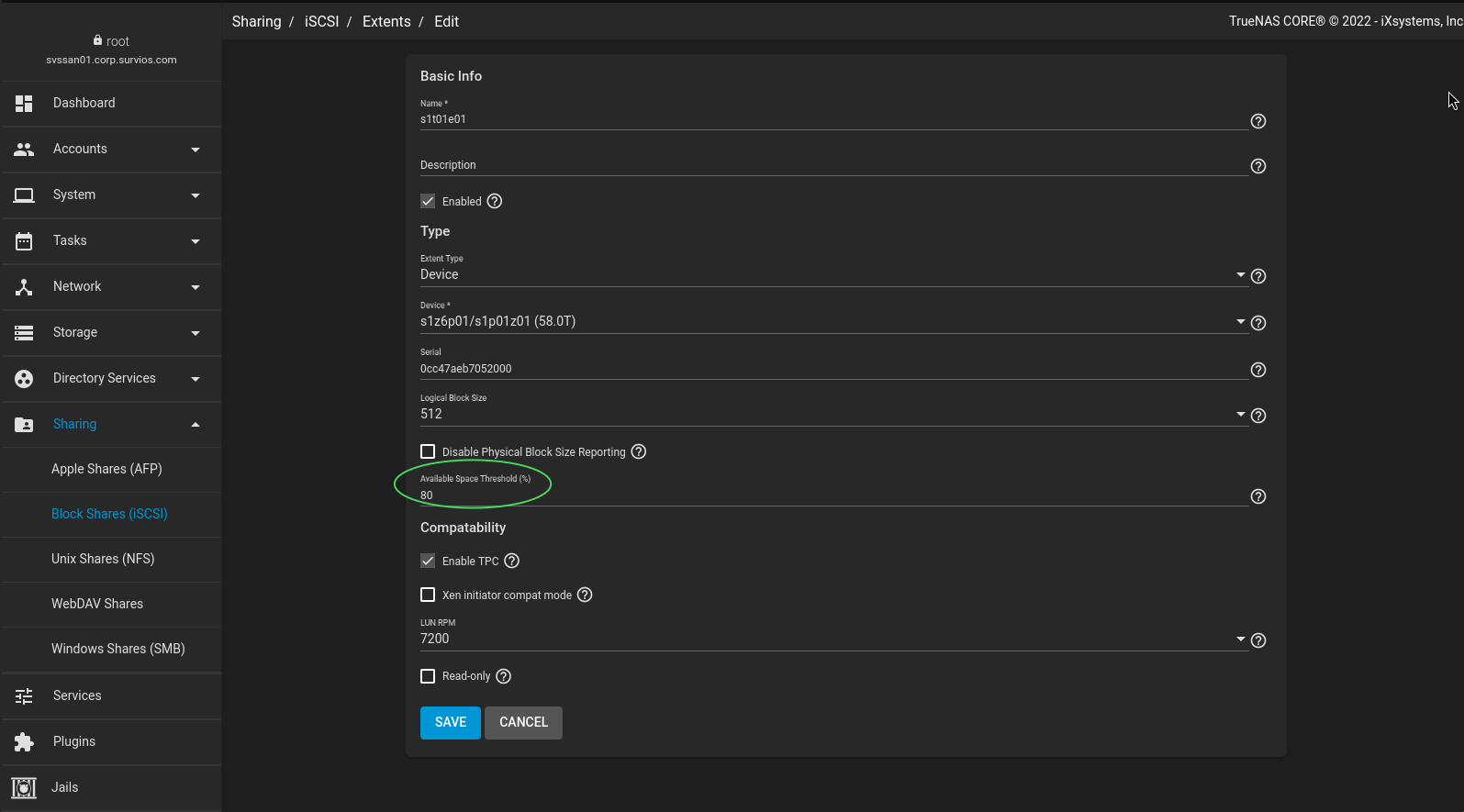
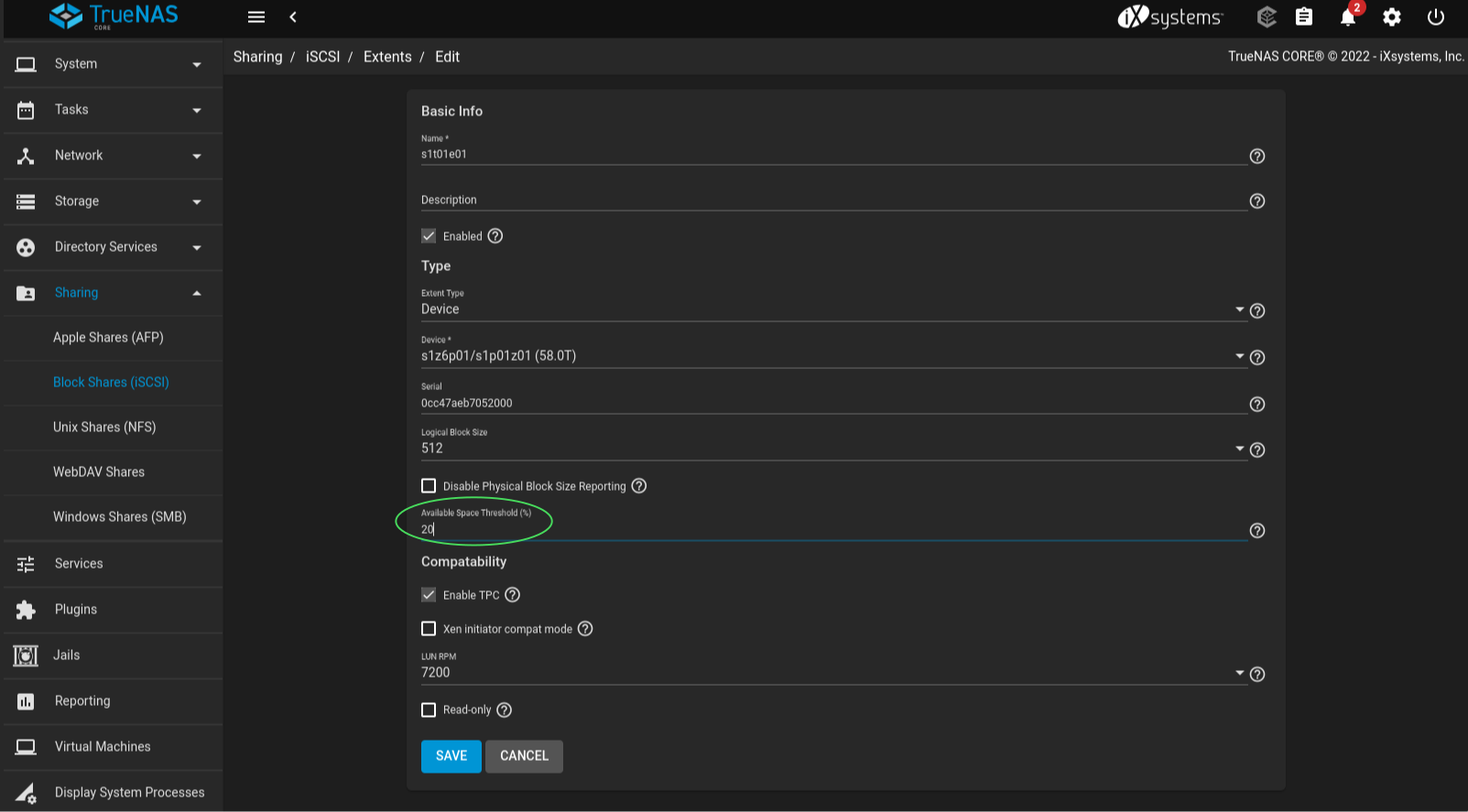
(bash) ctladm devlist -v
LUN Backend      Size (Blocks)    BS Serial Number    Device ID
  0 block         124644229184   512 0cc47aeb7052000  iSCSI Disk    0cc47aeb7052000
      lun_type=0
      num_threads=32
      vendor=TrueNAS
      product=iSCSI Disk
      revision=0123
      naa=0x6589cfc000000146a4302d61f1ef4116
      insecure_tpc=on
      avail-threshold=12763569068441
      rpm=7200
      file=/dev/zvol/s1z6p01/s1p01z01
      ctld_name=s1t01e01
  1 block         124639950976   512 0cc47aeb7052001  iSCSI Disk    0cc47aeb7052001
      lun_type=0
      num_threads=32
      vendor=TrueNAS
      product=iSCSI Disk
      revision=0123
      naa=0x6589cfc0000004890eda588bdf208b7
      insecure_tpc=on
      avail-threshold=51054276273769
      rpm=5400
      file=/dev/zvol/s1z6p02/s1p02z02
      ctld_name=s1t02e02
12763569068441 / 1024^4 = 11.61, then compare that number to the available space of the zvol (zfs list -t volume) then we get a different picture. The available space of the zvol is still 43.8T while the avail-threshold is set to 11.61T. Finally, we now have an available threshold which is below, way below, what are actual available space is. Now, we should go check ctladm reqsense 0 again and see if the errors have gone away.
(bash) ctladm reqsense 0
(7:0:0/0): REQUEST SENSE. CDB: 03 00 00 00 fc 00
(7:0:0/0): SCSI sense: UNIT ATTENTION asc:38,7 (Thin provisioning soft threshold reached)
(7:0:0/0): Info: 0x20
(bash) ctladm devlist -v
LUN Backend      Size (Blocks)    BS Serial Number    Device ID
  0 block         124644229184   512 0cc47aeb7052000  iSCSI Disk    0cc47aeb7052000
      lun_type=0
      num_threads=32
      vendor=TrueNAS
      product=iSCSI Disk
      revision=0123
      naa=0x6589cfc000000146a4302d61f1ef4116
      insecure_tpc=on
      rpm=7200
      file=/dev/zvol/s1z6p01/s1p01z01
      ctld_name=s1t01e01
  1 block         124639950976   512 0cc47aeb7052001  iSCSI Disk    0cc47aeb7052001
      lun_type=0
      num_threads=32
      vendor=TrueNAS
      product=iSCSI Disk
      revision=0123
      naa=0x6589cfc0000004890eda588bdf208b7
      insecure_tpc=on
      avail-threshold=51054276273769
      rpm=5400
      file=/dev/zvol/s1z6p02/s1p02z02
      ctld_name=s1t02e02
(bash) ctladm reqsense 0
(7:0:0/0): REQUEST SENSE. CDB: 03 00 00 00 fc 00
(7:0:0/0): SCSI sense: NO SENSE asc:0,0 (No additional sense information)