This year's Darknet badge is a wooden Printed Circuit Board (PCB), which will let us focus more on teaching basic electronics rather than soldering. This will be similar to the Darknet badge at DEFCON 30, but will be a little easier to assemble and make changes. The goal of this badge is to teach basic electronics, rather than soldering skills.
By using a wooden badge and supplying you with the parts, we're giving you the freedom and know-how to design your own circuit, your own custom badge.
Please note this is not an exhaustive electronics course, this is enough information to get you started and playing around, so some things have been greatly simplified and or glossed over.
Badge Levels
Badge Level 1
This is a light up badge. You will pick your own resistors, LEDs, and battery pack for a badge that lights up.
Badge Level 2
This badge is designed to blink in a sine wave. You will pick your own resistors, capacitors, LEDs, transistors, and battery pack.
Badge Level 3
This badge is designed to blink in a square wave. You still pick your own resistors, capacitors, LEDs, 555 timer, and battery pack
~ (Tilde)
The ~ sign just means "approximately". While assembling a badge, there are some component values that need to be used, but do not have to be precise. So in this documentation, you may see some numbers like ~125 Ω, which just means that you need to use approximately 125 Ω.
Electricity
A form of energy resulting from the existence of charged particles (protons / electrons)
Electric Current
A stream of charged particles (electrons) moving through a conductor or space. Current is measured in amperes (amps). There are two types of current: Direct Current (DC) and Alternating Current (AC). We will only be focusing on DC for these badges.
Think of current as the amount of water that flows through a hose.
Voltage
An electromotive force measured in volts (V)
Think of voltage as the water pressure in a hose. The more pressure the more voltage.
Parallel
When the whole voltage flows through each electrical component at the same time. The voltage in a parallel circuit should remain the same across all parallel components while the current will drop between components.
Think of it as transporting thousands of gallons of water from point A to point B. In a parallel circuit we would load up many vehicles the same way and have them take different streets to get to point B. The amount of water (current) will be less than the whole as it is split between vehicles, but the vehicles (voltage) will be able to travel faster to point B as they are not weighed down by too much water.
Series
When the whole current flows through each electrical component one after another. The current in a series circuit should remain the same across all components while the voltage will drop between components.
Think of it as transporting thousands of gallons of water from point A to point B. In a series circuit, we would load up one giant vehicle with all of the water (current). This giant vehicle (voltage) will be much slower as it is weighed down by a lot of water (current). But the amount of water (current) will not change inside that giant vehicle (voltage).
Power Supply
An electrical device that supplies electric power. Supplying voltage and amperes to a circuit.
Think of a power supply as the spigot where the hose is attached to and water is supplied from.
We use power supplies to supply the power to drive electrical components, like LEDs.
The electricity supplied by power supplies will flow from positive to negative. In this case it will be from the red wire (usually positive) to the black wire (usually negative).
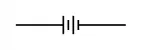
Battery (BT#)
A container consisting of one or more cells, in which chemical energy is converted into electricity.
Batteries are measured in voltage and amp hours.
Think of a battery as a container for storing the water for future use.
We use batteries to supply the power to drive electrical components like LEDs.
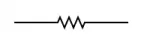
Resistor (R#)
A resistor is a passive electrical component that creates resistance in the flow of electric current.
Resistors are measured in ohms Ω.
Think of a resistor as what would limit the amount of water coming out of the hose. The force of the water would be considered the voltage, the amount of water would be the amps.
We use resistors to limit the amount of current to prevent damaging components like LEDs, transistors, and Integrated Circuits (IC).
Polarized Components
A polarized component is a component that can only be connected in a circuit one way. A non-polarized component can be connected in a circuit in any way.
Most resistors are considered a non-polarized component that can be placed in the circuit in any direction.
Most LEDs are considered polarized, which means there is usually a positive and negative side to the LED. You must pay attention to which side of an LED is the positive and the negative when connecting it to a circuit.
Think of non-polarized component as a hose. Water can flow through a hose in either direction, so it doesn't matter which direction the hose is connected to a water supply.
Think of a polarized component as the spigot that water comes from. The water only comes out of the spigot in one direction. While you could try to force water back into a spigot, there is a good chance that you will break the spigot.
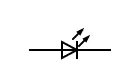
LED (Light Emitting Diode) (D#)
A Light Emitting Diode (LED) is an active semiconductor that emits light when a current flows through it. A LED is a polarized part, which means that we have to pay attention to the direction that the current flows through the LED. Current will flow from the Anode to the Cathode. The anode is generally considered positive and the cathode is generally considered negative. Most LEDs, not all, the flat side of the LED is the cathode, just think that the flat side forms a negative (-). Most LEDs, not all, the longer lead is the anode, just think that we have an extra lead so we can bend it around to make a + sign.
An LED is the blinky blinky part of a circuit.
Forward Voltage
The forward voltage is the amount of voltage that an LED consumes when current passes through the LED. The forward voltage is also the minimum voltage required for the LED to illuminate.
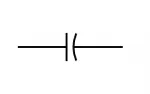
Capacitor (C#)
A capacitor is a passive electrical component that stores electrical energy in an electric field. Some capacitors are polarized and some are not. The ones for the Darknet badge are all polarized, so we must pay attention to which side is positive and negative on the capacitor. The negative side is labeled on the capacitor itself.
When the capacitor is charging, the current flows from positive to negative, and when the capacitor is discharging the current flows from negative to positive. Basically while a capacitor is charging power is moving in one direction, but when it is charged the power moves in the opposite direction.
Think of it like a deer scarer, as the deer scarer fills, the water is moving into the deer scarer, but once it is full it tips over and dumps all of the water out.
Capacitors are measured in farads (F).
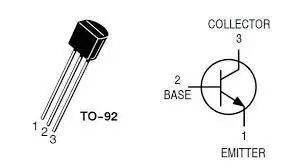
Transistor (Q#)
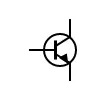
A transistor is an active semiconductor that can amplify or switch electrical signals and power. For the Darknet badge, we will be using transistors as switches.
A transistor has 3 leads, an emitter, base, and a collector. Depending on the power supplied to the base, will determine if the switch is on or off between the collector and the emitter.
The Darknet badge will be using transistors as switches. So think of the transistors as automatic light switches.
555 Timer IC (U#)
A 555 is an Integrated Circuit (IC) that is used as a timer, delay, pulse generation or oscillator.
Think of this as a really fancy sun dial.
Bistable Multivibrator
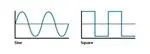
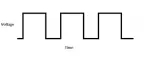
A multivibrator is an electronic device that produces a non-sinusoidal waveform. A sinusoidal (Sine) waveform is a wave that has a gradual increase and decrease. A non-sinusoidal waveform is a wave that does not have gradual increases or decreases, like a square wave. A picture is worth a thousand words:
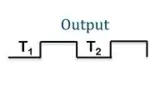
A bistable multivibrator just means that the wave has 2 stable states (T1, T2). In our case, the Badge Level 2 will have 2 LEDs. In a bistable multivibrator, that means that when one LED is on, the other LED is off. And when the second LED turns on, the first LED turns off. Otherwise known as a flip-flop.
Parts
Batteries
AAA, each battery is 1.5 V (volts) and ~ 1 Ah (Amp Hours)
AAA battery pack
Holds 3 AAA batteries in serial which gives us 4.5 V and 3 Ah for our circuit
Resistors (R#)
Ranging from 12 Ω to 9.1K Ω.
LEDs (D#)
Green, orange, red, and yellow LEDs to choose from
Capacitors (C#)
100 μF (micro Farad), 470 μF, 1 F
Transistors (Q#)
2N2222A
Integrated Circuit (U#)
555 Timer
Formulas
Ohm's Law
Ohm's Law is the formula used to calculate the relationship between voltage (V), current (I), and resistance (R) in an electric circuit. Where V is measured in volts, I is measured in amps, and R is measured in ohms Ω.
V = IR
RC Time Constant
RC Time Constant is the formula we will use to calculate the frequency (f) of the LED flash (blinking) using a capacitor (C) and resistor (R). Where C is measured in farads, and R is measured in ohms Ω.
f = 1/(τ RC)
τ (Tau) in the formula above is the mathematical constant of 2π (pi) or 6.28...
For more reading about the awesomeness of tau, please visit
https://tauday.com/tau-manifesto
or
https://www.youtube.com/watch?v=FtxmFlMLYRI
555 IC Formula
We will use a square wave duty cycle formula to calculate the LED flash rate. We will need to know the values of two resistors (R1, R2) and one capacitor (C1).
When calculating a square wave duty cycle, we will have to calculate how long the LED is on for (Time High) and how long the LED is off for (Time Low).
Thigh = 0.7 * (R1 + R2) * C1
Tlow = 0.7 * R2 * C1
Badge Level 1
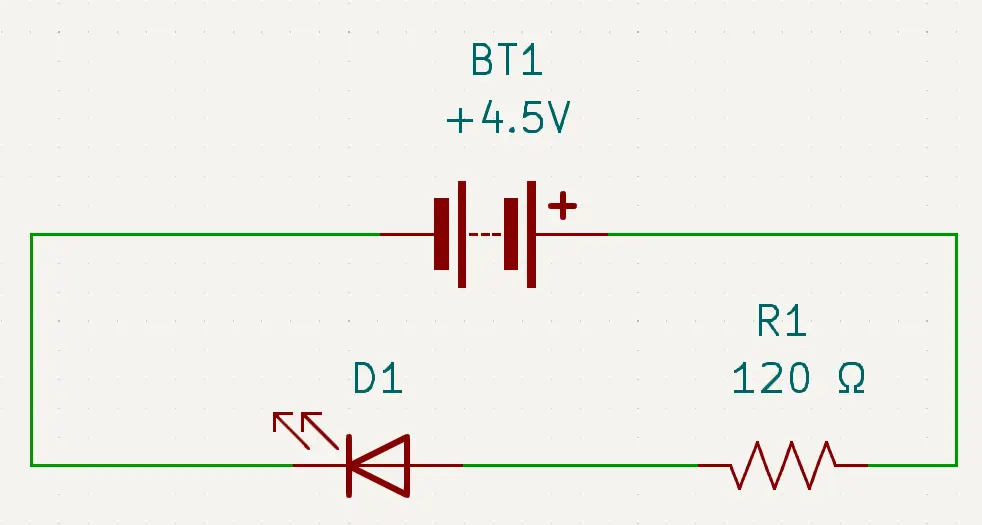
Badge level 1 consists of a power supply (batteries and battery pack) (BT1), resistors (R#), and LEDs (D#).
LEDs have a maximum current that can go through them, if we exceed that current, then a LED will pop like a balloon with too much air. We must limit the amount of current that an LED receives. To limit the current, we use resistors. The LEDs that we are using have a rating of ~0.02 amps.
We can use Ohm's Law to calculate what the resistance needs to be for the LEDs. We know that the power being supplied will be 4.5 V (3 AAA batteries in series (1.5 * 3)), and we know that the current should be ~0.02 amps.
There is one more critical piece that we need to learn about LEDs: LEDs have something called forward voltage. LEDs need to have current to turn on, but they also consume voltage as it passes through them. In our case, all LEDs have a forward voltage of 2.1 V, which is also the minimum voltage that is required to turn on the LED.
So if we just had a single LED in this circuit, the math is easy.
V = IR
4.5 - 2.1 = 0.02 * R
2.4 = 0.02 * R
2.4 / 0.02 = R
120 = R
So in this example, we would need 120 Ω of resistance for that LED. So we would put ~120 Ω resistor in the circuit between the power supply and the LED.
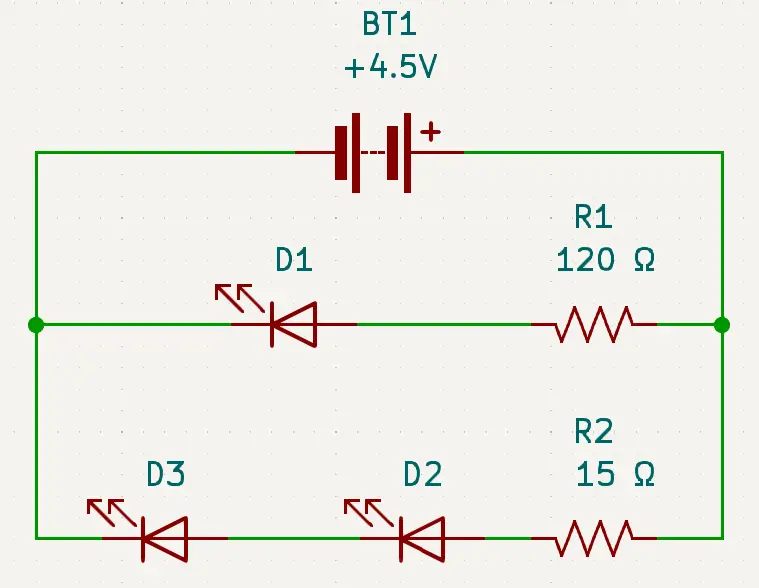
But wait, our circuit is a little more complex than that. We have 3 LEDs in total. Two of the LEDs are wired in series (D2, D3) and 1 LED is wired in parallel (D1) with two LEDs (D2, D3). One of the parallel lines only has 1 LED (D1).
Since we know that LEDs in parallel (D1, D2) will receive the same voltage, than we know the single LED (D1) will use the formula that we used above.
V = IR
4.5 - 2.1 = 0.02 * R
2.4 = 0.02 * R
2.4 / 0.02 = R
120 = R
So the single LED (D1) will still use the 120 Ω resistor (R1).
But the other line contains 2 LEDs wired in series (D2, D3). Remember the definition of a series circuit, all parts receive the same current, but the voltage will drop. So 2 LEDs in series (D2, D3) will still need ~0.02 amps, but will consume twice the amount of voltage. So our formula for the 2 LEDs in series (D2, D3) will look like this:
V = IR
4.5 - (2 * 2.1) = 0.02 * R
4.5 - 4.2 = 0.02 * R
0.3 = 0.02 * R
0.3 / 0.02 = R
15 = R
So for our 2 LEDs wired in series (D2, D3) we will need to have ~15 Ω resistor (R2).
To sum everything up, for our level 1 badge, we will need to have a power supply, 3 LEDs, and at least 2 resistors. The single LED (D1) will need to have a ~120 Ω resistor (R1), and the 2 LEDs (D2, D3) will need to have a ~15 Ω resistor (R2).
Badge Level 2
Badge level 2 consists of a power supply (batteries and battery pack) (BT1), resistors (R#), capacitors (C#), transistors (Q#A), and LEDs (D#) to make a blinking badge.
Oooooo
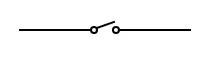
The transistor will act as a switch between its collector and emitter depending on the voltage of the base. The goal will be to supply voltage to the base. When the voltage of the base hits ~0.7V the switch will close and power will flow between the emitter and the collector.
When the voltage is below ~0.7V the switch is open which prevents power from flowing:
When the voltage is above ~0.7V the switch is closed, which allows power to flow:
Now that we have a base understanding of transistors, lets start to design our circuit.
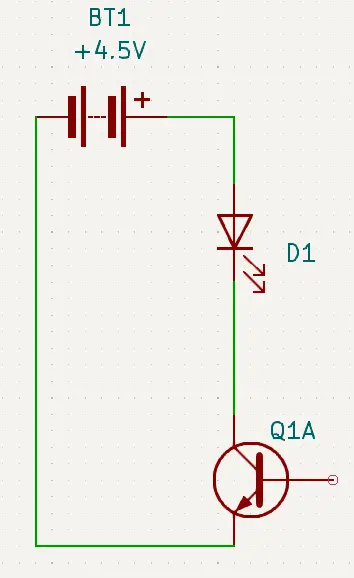
We know that for an LED to work, it has to have power flow the anode to the cathode. So in our circuit design, we will need to have power (red) (BT1) flow into the anode of the LED (D1), then connect the cathode of the LED (D1) to the collector of the transistor (Q1A), and then have the emitter of the transistor (Q1A) connect back to the negative (black) (BT1) of the power supply.
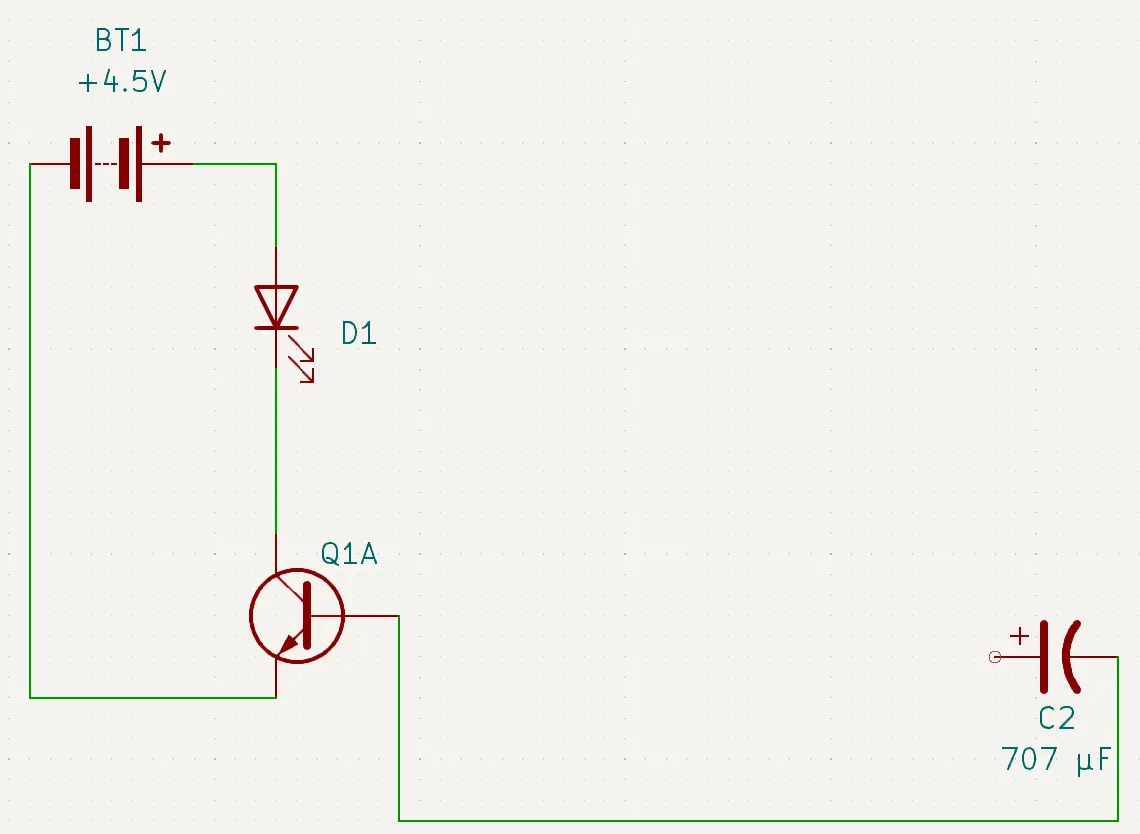
Hmmm, but now we need to connect something to the base of the transistor (Q1A) that will supply ~0.7V sometimes, but not all of the time. Out of the components that we have, do we have something that will first charge itself, and then discharge itself? Why yes, yes we do. We have capacitors. Remember, a capacitor will allow power to flow from positive to negative while it charges, and when it is fully charged it will then discharge itself in the opposite direction. So lets add a capacitor (C2) to our circuit:
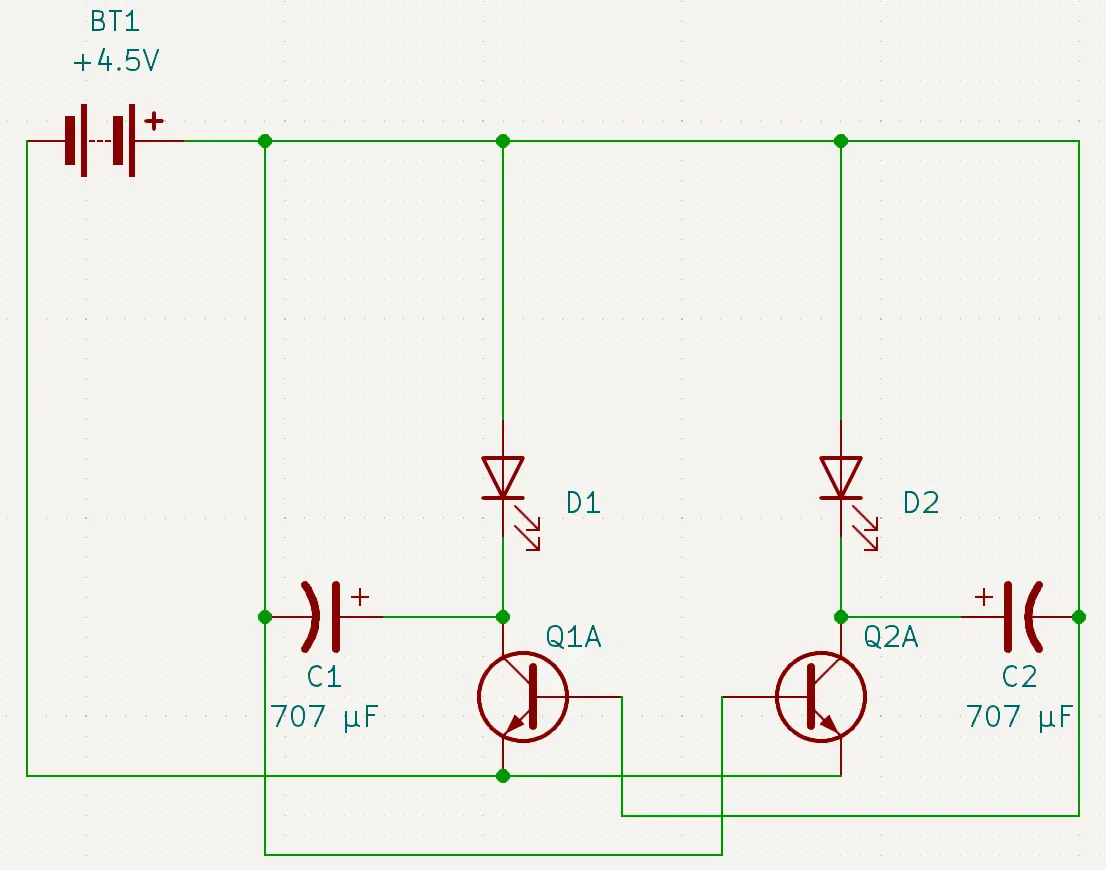
Now we have a new problem, where do we connect the positive side of the capacitor (C2) to? We need to connect it to some place that it can receive a charge so that it can discharge into the base of our transistor (Q1A). What if we double our circuit and add another LED (D2), transistor (Q2A), and capacitor (C1)? By doing this, we can create what is called a bistable multivibrator circuit. As one capacitor is charging the other capacitor is discharging. This will cause us to have one LED on, and one LED off, and then the circuit will flip, and the LED that was off will now be on, and the LED that was on will now be off.
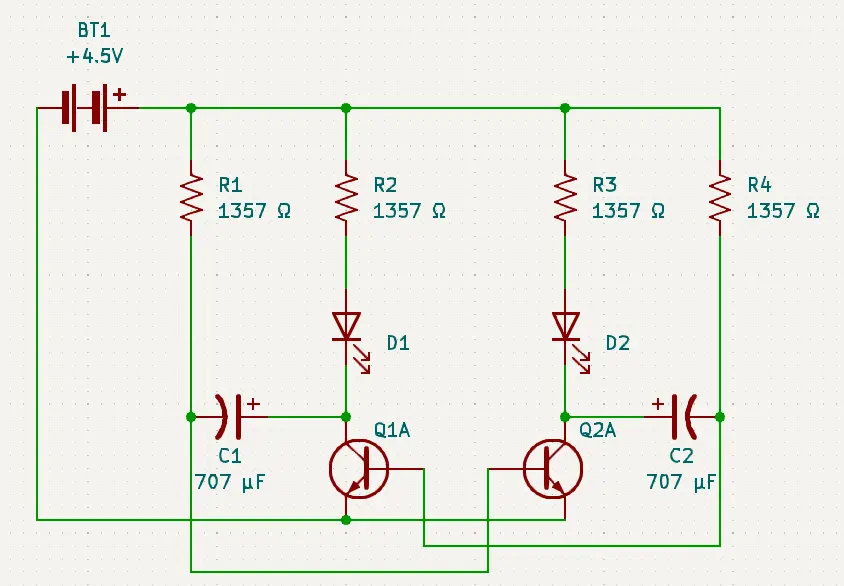
Looking at this circuit, we can see that we have the negatives of the capacitors (C1, C2) attached to the bases of the transistors (Q1A, Q2A) and that we have the positive of the capacitors (C1, C2) attached to the collectors of the opposite transistors (Q1A, Q2A). So when LED (D1) is on, it will be charging the capacitor (C1). When capacitor (C1) is full, it will discharge ~0.7V into the base of the transistor (Q2A) causing the switch to close between the emitter and the collector of transistor (Q2A). This will then turn on LED (D2) which will light up and start to charge the capacitor (C2). When capacitor (C2) is charged, then the circuit will flip back to LED (D1) lighting up, and capacitor (C1) charging while capacitor (C2) discharges, and LED (D2) is off.
There is one problem with our circuit though, we need to add in resistors to protect the components by limiting the amount of current each component receives.
We have two LEDs (D1, D2) in parallel, so we can use Ohm's Law to calculate the resistance that we need to protect the LEDs. Refer to Badge Level 1 for how to use Ohm's Law.
But we also need to add resistors to the capacitors (C1, C2). This is where we can use the RC Time Constant formula defined in the formulas section.
As an example, let's use 707 μF capacitors and 1357 Ω resistors. To calculate the blinking frequency we would:
f = 1/(τRC)
f = 1 / (6.28 * R * C)
f = 1 / (6.28 * 1357 * 0.00707)
f = 1 / (8521.96 * 0.00707)
f = 1 / 60.2502572
f = 0.016597439521 Hz
So in this case, the LEDS (D1, D2) would blink at a rate of ~0.0166 times per second, or once every 6 seconds.
This means that we will be adding 2 resistors (R2, R3) to protect each of the LEDs that are wired in parallel, and adding 2 resistors (R1, R4) for the capacitors to determine the blinking frequency.
Our final circuit will look something like this:
Badge Level 3
Badge level 3 consists of a power supply (batteries and a battery pack) (BT1), resistors (R#), capacitor (C1), 555 Timer IC (U1), and a LED (D1).
Instead of transistors like we used in badge level 2 we will be using the 555 Timer IC (U1) in what is called an astable mode. Astable means that the 555 Timer IC (U1) will oscillate or fluctuate between off and on. This oscillation will be what causes the LED to blink.
The oscillation that we will be using is called a square wave:
When working with square waves, we need to look at a couple of time measurements. The first is how long is the square wave at its peak, and the second is how long is the square wave at its valley.
The square wave peak will determine how long the LED is on for, and the square wave valley will determine how long the LED is off for. Basically it will tell us what the blinking rate of the LED is.
We will start off with an example using the 555 Timer IC (U1) formula that we defined in the formulas section.
As an example let's use a 8412 ohm resistor (R1), a 369 ohm resistor (R2), and a 707 μF capacitor (C1). To calculate the square wave and therefore the blink rate, we will start with the Time High:
Thigh = 0.7 * (R1 + R2) * C1
Thigh = 0.7 * (8412 + 369) * 0.00707
Thigh = 0.7 * 8781 * 0.00707
Thigh = 6146.7 * 0.00707
Thigh = 43.457169
Then to calculate the square wave Time Low we would:
Tlow = 0.7 * R2 * C1
Tlow = 0.7 * 369 * 0.00707
Tlow = 258.3 * 0.00707
Tlow = 1.826181
So in this example the LED (D1) will turn on for ~ 43 seconds, and then it will turn off for ~2 seconds. Basically the LED (D1) will stay on for a long time and then it will blink off quickly and turn back on.
Now that we know how to calculate what the blink rate is using a square wave, we can start to design our circuit using the 555 Timer IC (U1). But first we need to learn a little about the 555 Timer IC (U1).
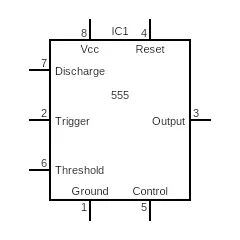
The 555 Timer IC (U1) has a total of 8 pins:
Ground (GND)
The ground pin (1) is used as ground for power to flow towards. As we apply voltage it will flow towards the ground pin.
Trigger (TR)
The trigger pin (2) is used to determine when the output pin needs to be turned on. This is triggered (hehehe) by reaching a threshold of less than 1/3 of the supplied voltage.
Output (Q)
The output pin (3) is where the power goes if the trigger pin is activated. So the output pin is either low, which means that it isn't supplying voltage (or very low voltage), or it is high, which means that it is outputting close to the voltage supplied.
Reset (R)
The reset pin (4) is like the old reset button on your Nintendo (yes I am that old). When pressed it will reset the state of the IC until the trigger is triggered. To activate the reset pin, we attach it to the ground.
Control (CV)
The control pin (5) is used to try and level out fluctuations in the voltage supplied. Usually this is just connected to the ground or the negative on the power supply.
Threshold (THR)
The threshold pin (6) is used to determine when the output pin needs to be turned off. This is triggered by reaching a threshold (hehehe) of more than 2/3 of the supplied voltage.
Discharge (DIS)
The discharge pin (7) will act as a ground or negative to discharge whatever is in the IC while it is on.
Vcc (VCC)
The Vcc pin (8) is connected to the positive end of the power supply. The power supply needs to supply a minimum of 4.5 volts.
So now that we know a little bit about how the 555 Timer IC (U1) works, we can really start to design our circuit.
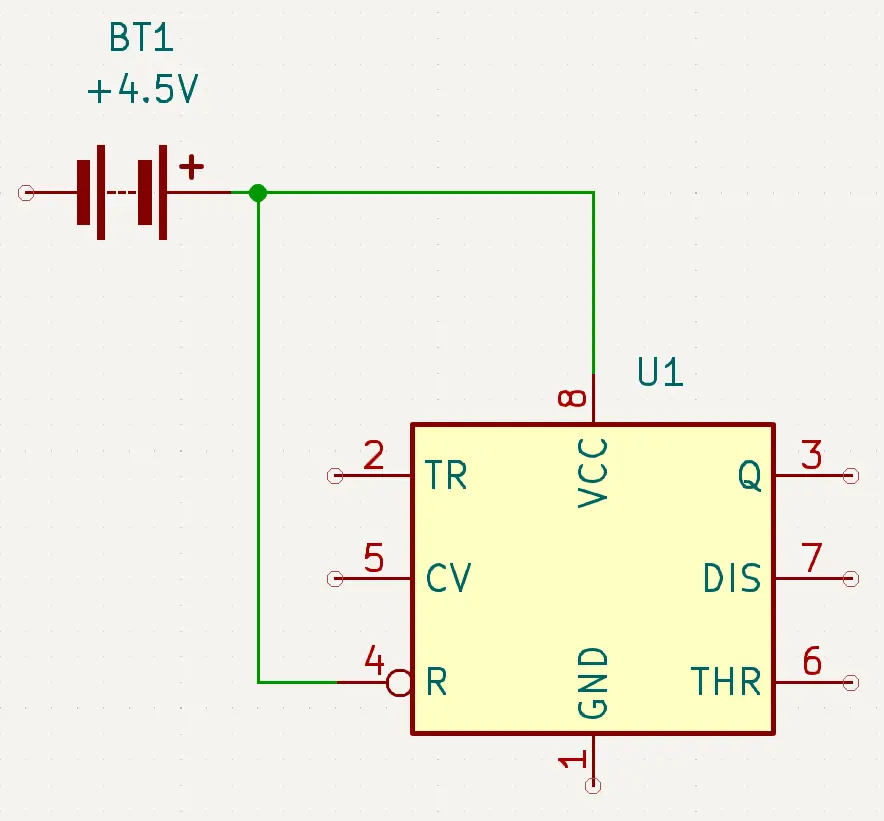
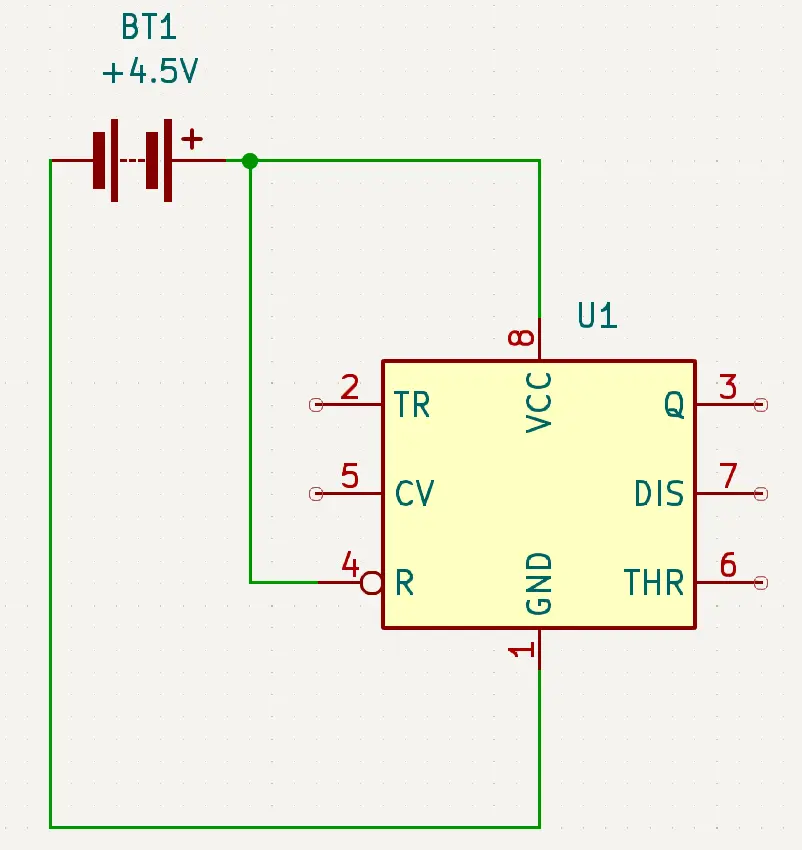
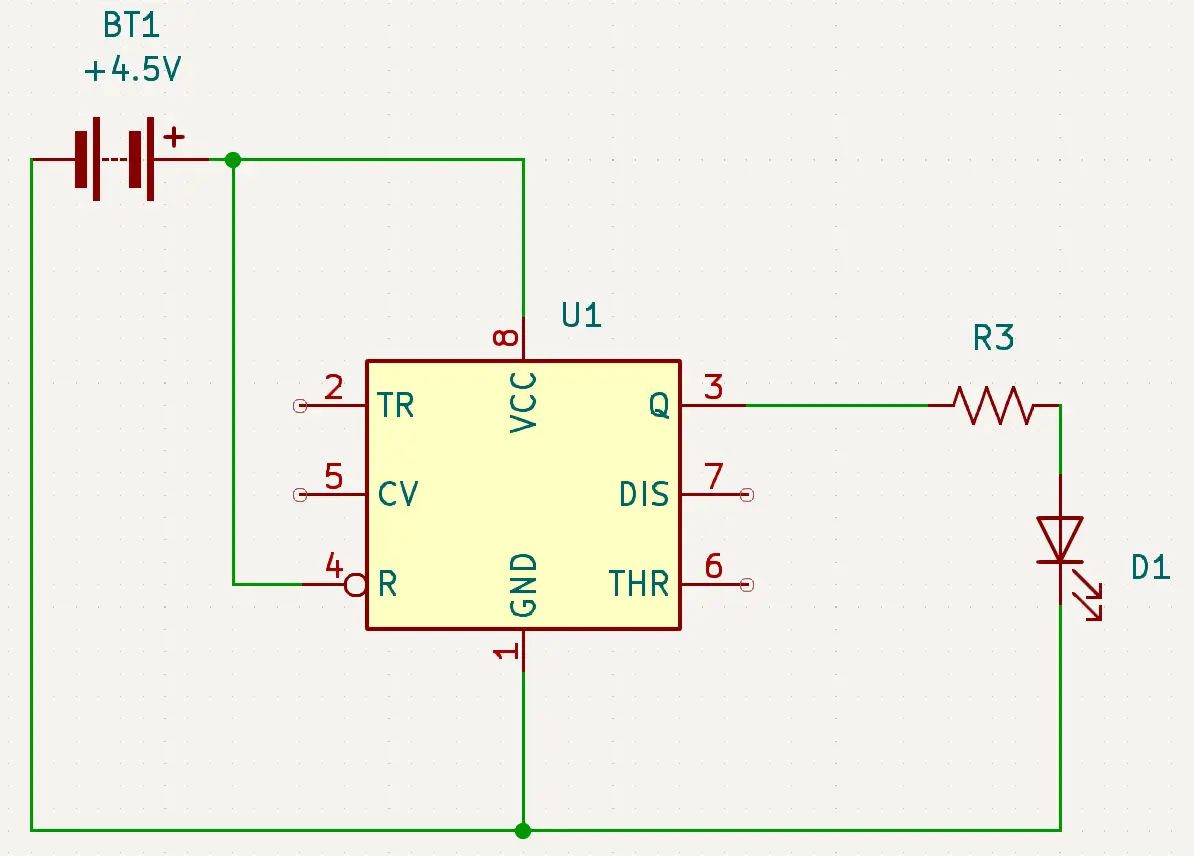
We know that we need to have power (red) go to Vcc (Pin 8), but we also want power (BT1) to go to Reset (Pin 4) as well. The reason that we are supplying power to Reset is that we don't want Reset to go to the ground and reset our IC (U1).
We also know that we need to have Ground (Pin 1) connect to negative (black) (BT1).
We know that Output is where the power will output itself, so that is where we need to connect the anode of the LED (D1). But remember, a LED needs a resistor inline so that it doesn't pop. So please use Ohm's Law to determine the resistor (R3) value to place before the anode. We will also need to connect the cathode of the LED (D1) to the negative (black) (BT1).
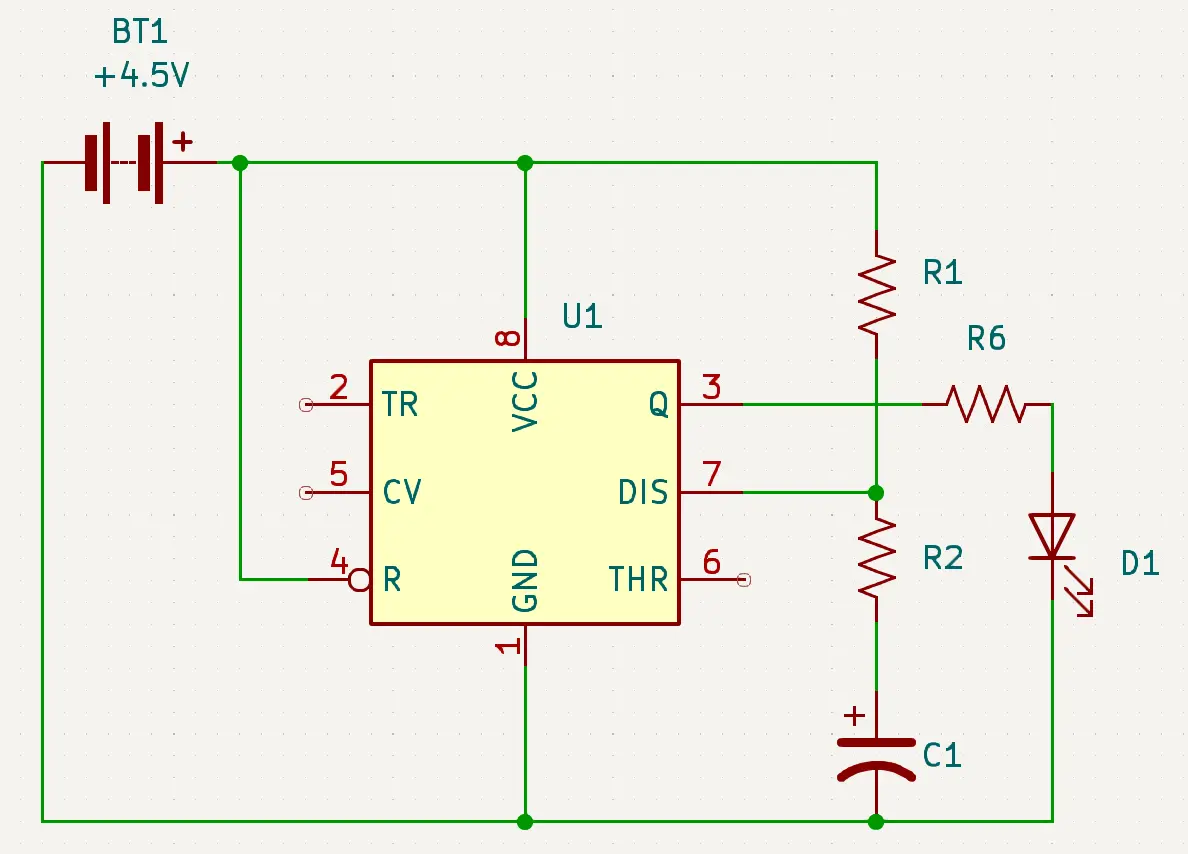
This is where the circuit gets a little bit tricky, as we need to connect the Discharge (Pin 7), the Threshold (Pin 6), and the Trigger (Pin 2). We will also need to add in a couple of resistors (R1, R2) and a capacitor (C1).
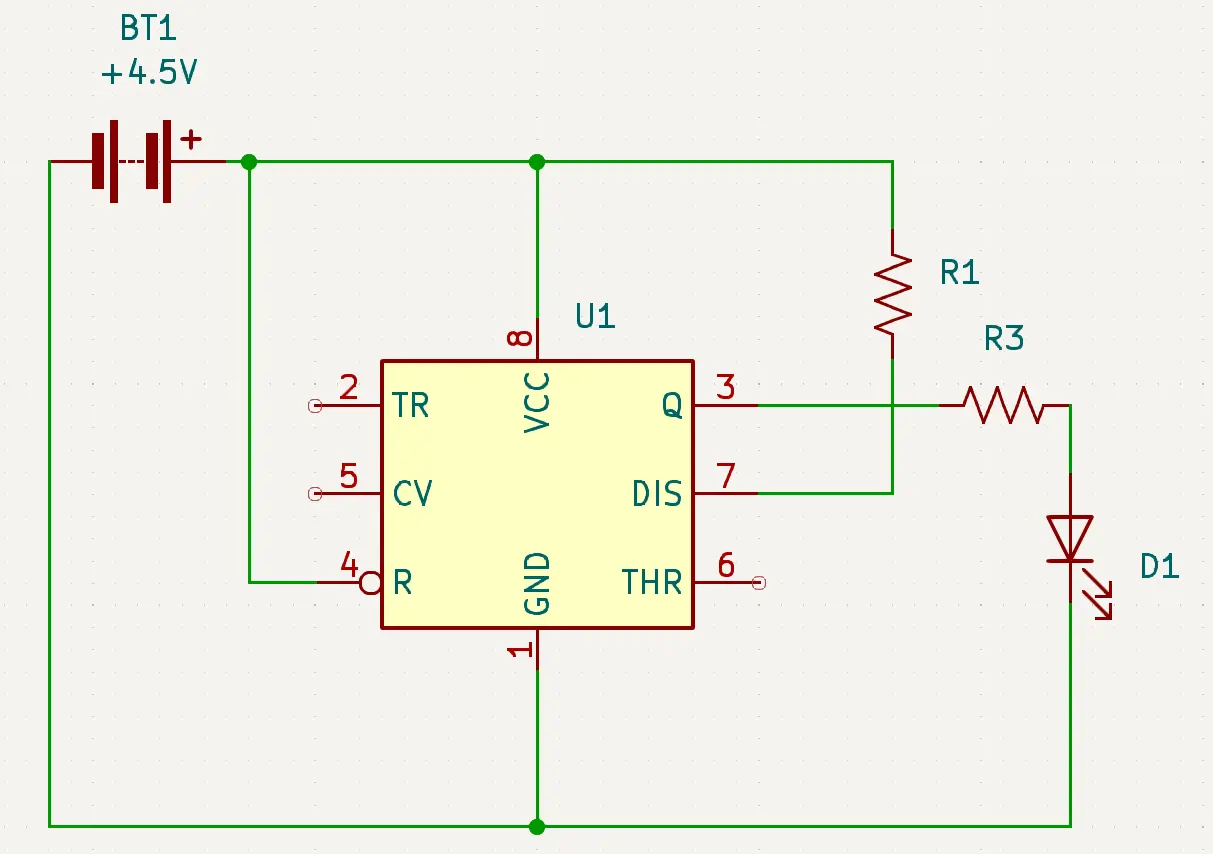
We know that when the IC (U1) is off, meaning that the Threshold (Pin 6) has more than 2/3 voltage, that the Discharge (Pin 7) is on. We will use the Discharge (Pin 7) to charge the capacitor (C1).
So to begin with, we need to connect the Discharge (Pin 7) to a resistor (R1). We also need to make sure that we have a complete circuit so we will attach the resistor (R1) to power (red).
Since the Discharge (Pin 7) will be used to charge the capacitor (C1), we need to add a resistor (R2) between Discharge (Pin 7) and the capacitor (C1). This resistor (R2) will slow the charge of the capacitor (C1) and therefore determine the value (low) of the square wave (how long the LED is off for).
Lets go a little more in depth into this. So when we turn on the power supply (BT1), the capacitor (C1) will be discharged, meaning it is like a dead battery. Also since we just applied power, we know that the Trigger (Pin 2) will be at less than 1/3 supplied voltage, so the IC (U1) will turn on and the LED (D1) will turn on. The Discharge (Pin 7) will also turn on, and begin to charge the capacitor (C1) through the resistors (R1, R2). Once the capacitor (C1) goes over the 2/3 supplied voltage required for the Threshold (Pin 6) then the IC (U1) will turn off, turning off the LED (D1) and Discharge (Pin 7) of the IC (U1). The IC (U1) will stay off until the capacitor (C1) is discharged. Once the capacitor (C1) goes below the 1/3 supplied voltage for the Trigger (Pin 2) then the IC (U1) will turn on, which will turn on the LED (D1) and the Discharge (Pin 7). This process will continue to repeat itself turning the LED (D1) on and off based on the values of the capacitor (C1) and the resistors (R1, R2).
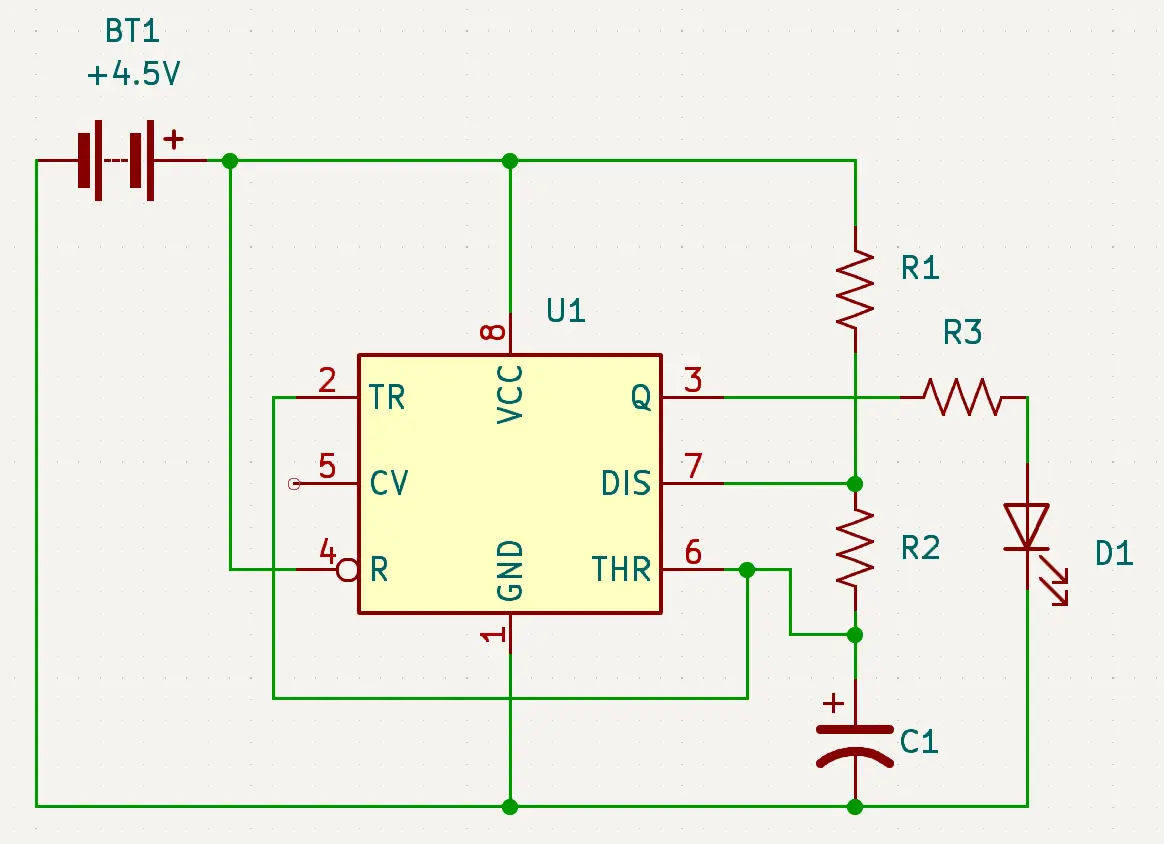
So now, we just need to connect the Trigger (Pin 2) and the Threshold (Pin 6) to the capacitor (C1) and our circuit should be complete.
Since we have such a complicated circuit, lets recap how it works:
When the Trigger (Pin 2) is less than 1/3 supplied voltage, then the IC (U1) will pass power through the Output (Pin 3) which will power the LED (D1) turning the LED (D1) on. It will also pass power through the Discharge (Pin 7).
The Discharge (Pin 7) is connected to the capacitor (C1) through a series of resistors (R1, R2), so when the IC (U1) is on, it will start to charge the capacitor (C1). Once the capacitor (C1) reaches 2/3 of supplied voltage, then it will activate the Threshold (Pin 6). When Threshold (Pin 6) is activated, then the IC (U1) will turn off, and the LED (D1) will turn off. While the IC (U1) is off, the Discharge (Pin 7) will also be off.
When the capacitor (C1) drops below 1/3 supplied voltage, then the Trigger (Pin 2) will activate and turn the IC (U1) back on.
This process will repeat itself for as long as there is power supplied to the circuit, causing the LED (D1) to blink according to the values calculated for the square wave.
Congratulations, you, in theory, have a working Darknet 13 level 3 badge.
Congratulations you, in theory, have a 1, 2 or 3 working Darknet Badges for DEFCON 32